free download
Excel Thermometer
Chart Template
A ready-to-use fundraising thermometer for Excel and Google Sheets. Enter your goal and amount raised — the chart updates automatically. No formulas to write, no design work required.
Download free template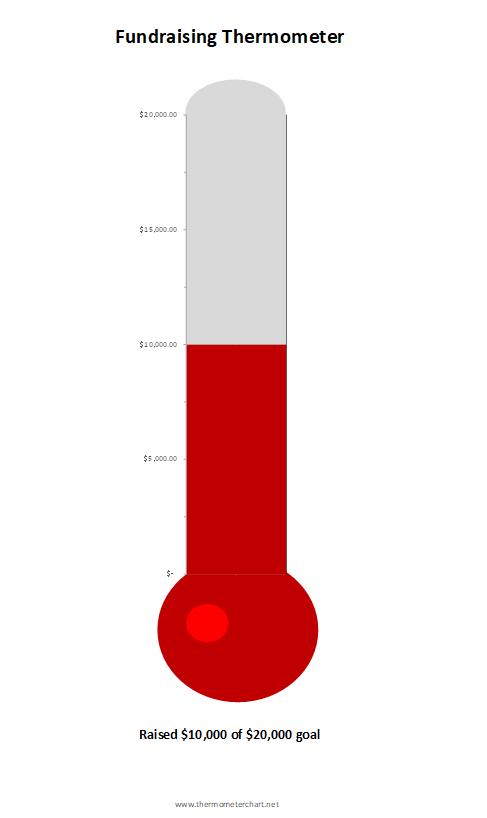
What’s included
Pre-built thermometer chart
Classic vertical thermometer that fills as you approach your goal. No chart setup needed.
Two cells to edit
Just enter your goal amount and amount raised. Everything else updates automatically.
Google Sheets compatible
Open it directly in Google Sheets from Google Drive. Works without Excel installed.
Print ready
Sized to print cleanly on a single page for bulletin boards, office displays, or event signage.
Need an embeddable thermometer?
The Excel template is great for printed displays. If you need a live thermometer on your website — one your donors can see update in real time — the embeddable widget is a one-line paste into any page.
Frequently asked questions
Does this work in Google Sheets?
Yes. Upload the .xlsx file to Google Drive and open it with Google Sheets. The chart converts automatically.
Which versions of Excel are supported?
Excel 2016 and later on Windows or Mac. It also works in Excel for Microsoft 365.
Can I change the colors?
Yes — right-click the chart series and choose “Format Data Series” to pick any fill color.
Is this really free?
Completely free, no account required, no email needed. Just download and use it.
Ready to download?
Free Excel thermometer chart template — no signup required.
Download free template